How to Optimize Your Website for ChatGPT, Perplexity, and AI Search

Table of Contents
A business can have a website that contains plenty of useful and detailed information about its products and services but still not show up in AI search.
This is because searchability does not depend on content alone. A site’s technical setup also plays a big role in ensuring a business is mentioned in AI-generated answers. Factors such as settings blocking crawlers and poorly structured copy can prevent AI search tools from accessing and understanding content. Therefore, it is important to learn how to optimize your website for ChatGPT, Perplexity, and AI search visibility.
The good news is that your business can fix technical issues without you having to rebuild your entire website. Checking the settings can help make your content more accessible and understandable for AI search systems so that your company can appear in their answers. These technical improvements are part of generative engine optimization (GEO), which is the practice of making digital content more efficient so it can be referenced by AI search tools. Unlike search engine optimisation (SEO), which focuses on ranking and clickable links, GEO focuses on mentions in AI-generated answers.
Why AI Tools Skip Some Websites
Many AI companies use different crawlers to find and read web content. Among them are OpenAI’s OAI-SearchBot, Anthropic’s Claude-SearchBot, and PerplexityBot. If your website blocks one of these crawlers, AI search engines may not be able to access your pages.
Bear in mind that even if a crawler reaches your page, your content still needs to be easy to grasp. This is because AI search visibility depends on both access and understandable information. If search systems have little context about your pages, they can skip your business and mention your competitors instead. It is recommended to have clear headings, detailed content, structured data, and author information.
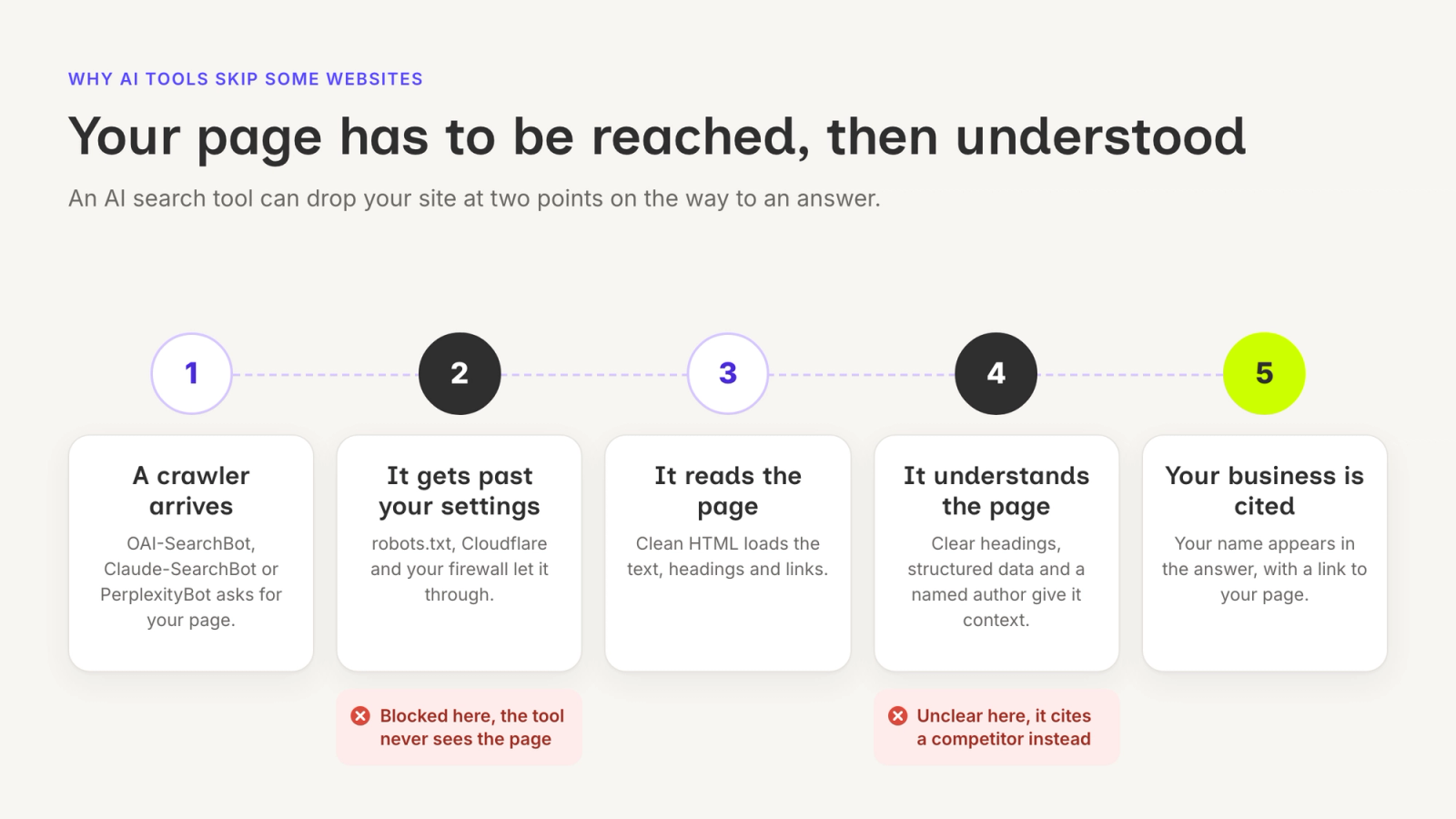
Crawler Access: robots.txt Content Signals and Cloudflare and WAF Settings
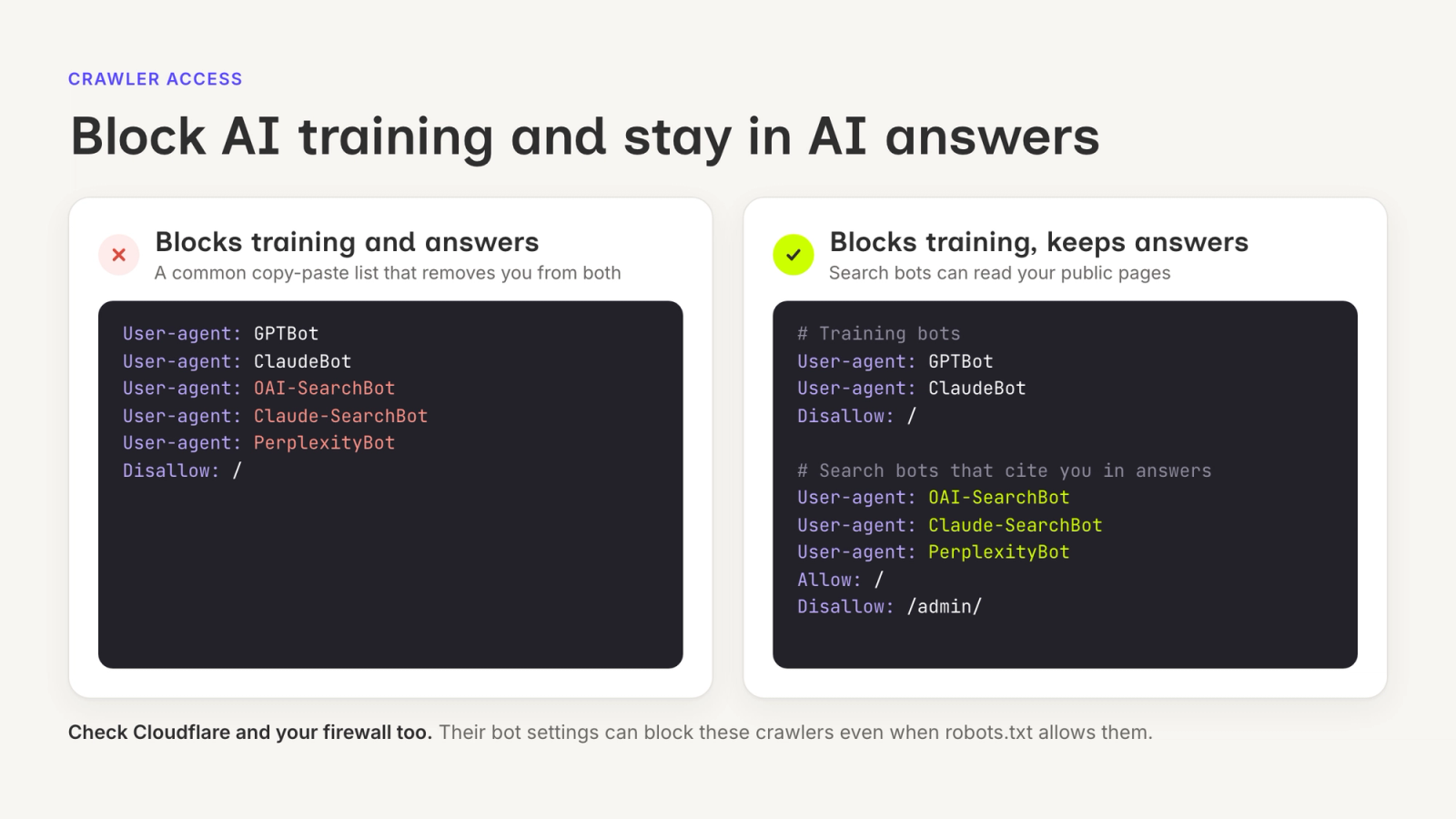
Crawlers need to be able to access a webpage before AI search tools can use the information on it. Also known as search engine bots and spiders, crawlers are software programs that search websites and organize their content. Crawlers, however, can be affected by technical settings, preventing them from reaching and analyzing a page. The technical settings you can check are robots.txt, Cloudflare, and web application firewall (WAF).
What it is
A robots.txt file tells crawlers which pages of a website can be accessed, while Cloudflare protects websites from cyber threats. WAF monitors and blocks unwanted or unsafe traffic on the Web.
Why it matters
Crawlers may be able to access your page but still be blocked by a firewall. When blocked, AI search tools won’t be able to detect your website.
Who does it
A developer or technical SEO specialist handles technical changes. A marketer identifies the pages and crawlers that need to be checked.
How to confirm it worked
Review your robots.txt file and Cloudflare settings, then check important URLs for blocking rules. Understand how robots.txt AI crawlers interact with these rules, especially when specific pages need to be accessed. See if disallow rules block important pages on your site and if a noindex tag has been added on your pages.
Structured Data: Article, Person, and FAQ Schemas
Structured data is information organized in a standardized format, or predefined schema, so that it can be easily read and understood by both humans and machines. A predefined schema is a fixed set of rules that defines how data is organized in a database. It can describe content such as articles, people, and products. By using a schema for AI search, systems better understand website context. Here are three core schema types for improved AI visibility:
- Article schema identifies a page as an article and provides information like publication date, author, headline, and image.
- Person schema provides information about the author of the content.
- FAQ schema tells search engines and AI models that a page contains question-and-answer content.
What it is
Structured data is organized information that helps search engines understand what a page and its content are about.
Why it matters
Structured data is important because it makes it easier for search engines and other systems to identify and interpret information on a page.
Who does it
A developer usually implements structured data, with input from the content or SEO team.
How to confirm it worked
To confirm if your structured data works, test your live web page URL using Google’s Rich Results Test. The structured data should match the content on your page.
Page Structure: Headings, Clean HTML, and Answer-First Paragraphs
Page structure refers to how content is organized on a webpage. It uses headings, HTML, and paragraphs for efficient navigation and improved readability.
What it is
A well-structured page uses descriptive headings, clean HTML, and direct answers. The heading describes what the page is about, while the supporting headings break the information into smaller parts. Consistent and clean HTML improves the readability, performance, and maintainability of a website. Meanwhile, answer-first paragraphs provide the answer and explain it right away so that readers no longer need to search for it.
Why it matters
Having a clear page structure helps readers identify the main information on a page. It also makes it easier for search systems to scan the contents.
Who does it
A content writer or marketer improves the headings and written structure, while a developer checks the underlying HTML.
How to confirm it worked
Check that the semantic elements, such as the header, main content, headings, and footer, are in the correct order. Once you are finished, conduct a technical and SEO audit using W3C Nu HTML Validator for HTML validation, Chrome DevTools for performance and SEO scores, and Screaming Frog SEO Spider for site crawl.
Authors and Trust Signals
Your readers should know the people and organizations behind your site’s content. This way, they can check whether the information provided is trustworthy and relevant to their needs.
What it is
Author and trust signals are indicators that prove that the writer of a page is real and credible. Author signals include the writer’s real name, profile page, and credentials. Trust signals include citations, buyer reviews, and security markers such as HTTPS.
Why it matters
Knowing who wrote the content is important because it gives readers peace of mind and allows AI search systems to decide if the source should be cited and recommended.
Who does it
Marketing, content, and web teams
How to confirm it worked
Check that the author’s name is visible and their information is consistent across relevant pages.
Sitemaps and llms.txt
Sitemaps and large language models (LLMs) help AI crawlers find, read, and understand your content. By using your website’s information, AI engines can cite your business in their search results.
What it is
A sitemap is a file that lists the important pages on a website so that search engines can crawl and organize them. An llms.txt file helps LLM programs like ChatGPT, Gemini, and Claude understand your content structure.
Why it matters
A sitemap is important because it helps search systems discover and revisit pages. Meanwhile, llms.txt helps AI systems understand a website’s content and structure.
Who does it
A developer or SEO specialist manages a sitemap, while a developer or technical SEO specialist tests llms.txt.
How to confirm it worked
Open your sitemap URL in a browser and check if it loads without errors. You can also submit your sitemap through Google Search Console and look for a success status. Also check that your robots.txt file isn’t blocking search engines from accessing your sitemap.
To check whether your llms.txt file works, open its URL in your browser and make sure the text and links load properly. You can also copy the contents into an AI tool like ChatGPT or Claude and ask it to describe your business accurately.
How to Test the Whole List
Once you have made the technical changes, test whether your business or content appears in AI-generated answers.
What it is
Testing for AI search optimization means checking your website’s content so that your business is mentioned when people ask search tools for relevant questions about your industry, products, and services.
Why it matters
Testing shows whether your technical changes are helping your website appear in AI search tools.
Who does it
A marketer or an SEO team creates the questions and records the results. A developer investigates technical problems.
How to confirm it worked
Create a list of questions your customers might ask. Include questions about your products, services, industry, and common problems your customers have. Run the same questions in ChatGPT, Perplexity, and other AI search tools. Repeat the test over time so you can compare changes in AI search visibility.
For those who want to track their results without the need for a separate spreadsheet, Glowtify’s AI visibility tracking helps monitor how often a business appears in AI answers. Glowtify’s platform includes a performance dashboard for tracking AI visibility.
Final Checklist
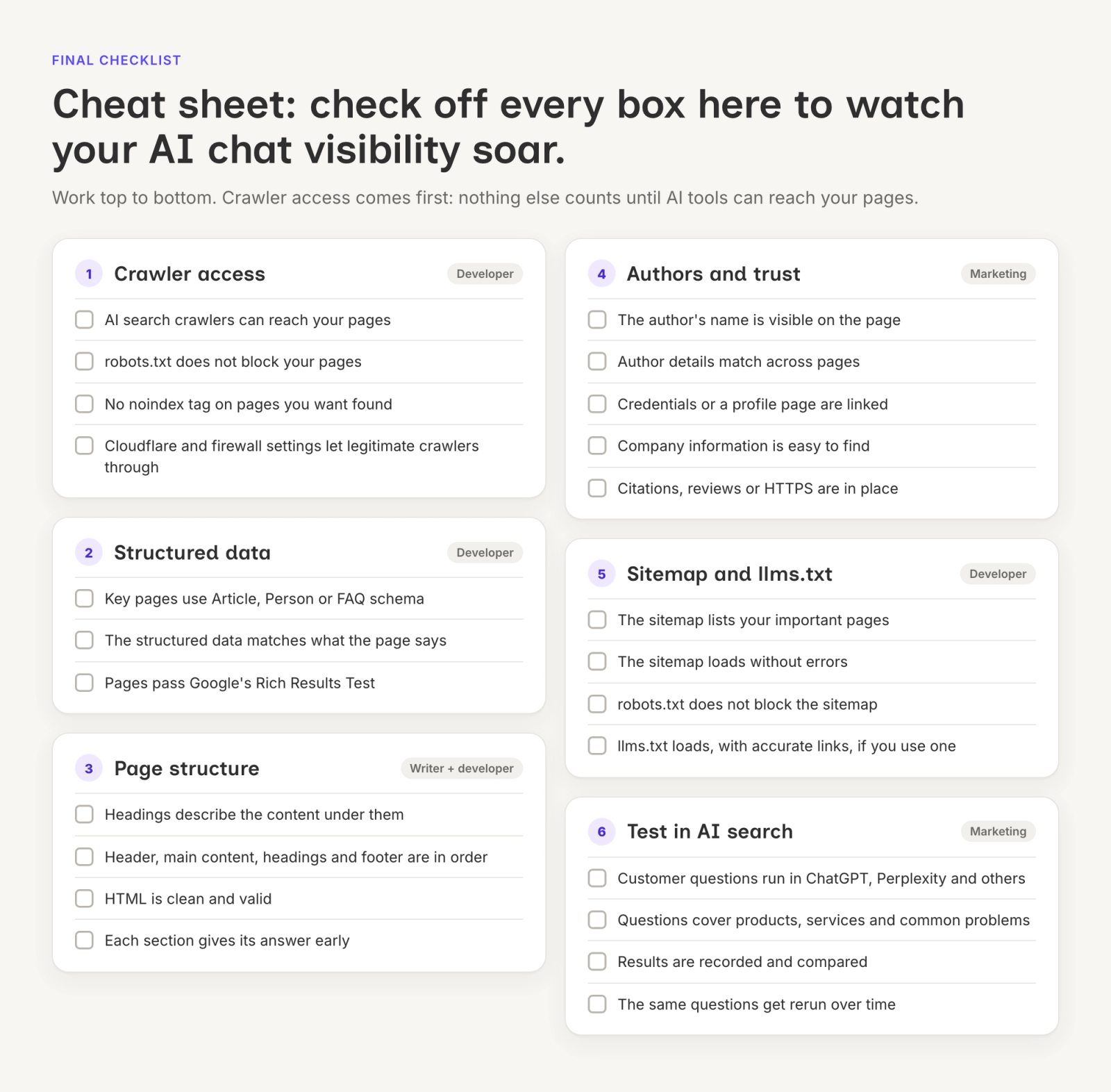
Once you have completed the technical work, use this checklist for one final review.
Crawler Access
□ Your pages can be accessed by relevant crawlers
□ robots.txt does not block your pages
□ noindex is not preventing your pages from being indexed
□ Cloudflare and WAF settings are not blocking legitimate crawlers
Structured Data
□ Relevant pages use appropriate structured data
□ The structured data matches the content on your page
□ Structured data has been tested using Google’s Rich Results Test
Page Structure
□ Headings clearly describe the content
□ Headings and other semantic elements are in the correct order
□ HTML is clean and structured
□ Relevant sections provide direct answers early
Authors and Trust Signals
□ The author’s name is visible
□ Author information is consistent across different pages
□ Author credentials or profile information are provided
□ Company information is provided
□ Trust signals, such as citations, reviews, or HTTPS, are present
Sitemaps and llms.txt
□ The sitemap lists the important pages on the website
□ The sitemap loads without errors
□ robots.txt does not block access to the sitemap
□ llms.txt loads correctly if you use it
□ The information and links in llms.txt are accurate
AI Search Testing
□ Customer questions have been tested in ChatGPT, Perplexity, and other AI search tools
□ Questions cover your products, services, industry, and customer problems
□ Results have been compared
□ Tests have been repeated over time
Remember to build a website not only for AI systems but also for your readers. Make sure your content is clear and useful and that you always check for technical issues. If you want to optimize your website for ChatGPT, Perplexity, and AI search visibility, start with the technical foundation. Check crawler access first, review your pages, then test if and how your website appears in AI search.